Is Your Phone Vibration Dead? How to Diagnose and Fix Haptic Feedback Issues
A silent phone breaks the tactile loop you depend on. You tap a glass surface. Nothing pushes back. The underlying reason usually splits into two domains: a software stack corrupted during an OS patch, or a physical linear resonant actuator that has genuinely failed. Jumping straight to component replacement without carrying out diagnostic work for the actual fault wastes hours. It also burns spare parts. You must carry out isolation work for the variable first.
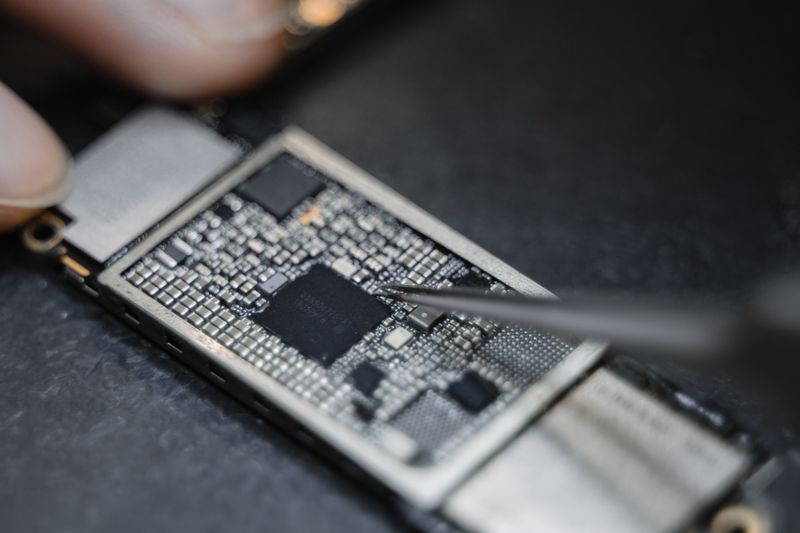
Most technicians point the finger at the hardware right away. They pry open chassis panels before they even check permission states. That habit skips essential groundwork. Haptic feedback relies on a dependency chain that spans from the kernel down to the motor windings. The operating system must carry out transmission of input commands to the subsystem. The subsystem translates those signals into timed voltage pulses. The motor converts electrical energy into physical displacement. Break any segment in that sequence, and the output stops.
Post-update glitches tend to surface right after a firmware flash. System partitions shift. Permission scopes change. Legacy input drivers occasionally lose alignment with the new kernel while background accessibility services attempt to re-register themselves. New devices frequently arrive with factory calibration offsets that never got finalized during assembly QA. Even after a screen replacement, the operator might forget to reseat the haptic flex connector or neglect to perform configuration for the driver interface. You must verify the software layer before you touch a single screw.
We leverage a lightweight browser-based testing environment to carry out validation work across the hardware. The tool communicates directly with the Web Vibration API, that is, the Application Programming Interface specification that grants web content access to the vibration actuator. You do not need native binaries. The interface divides testing work into three execution paths.
Continuous mode drives the motor at a steady duty cycle. You toggle the switch, and the coil sustains a constant hum. This pattern reveals baseline power delivery issues. If the actuator spins up weakly or drops out after a few seconds, the voltage regulator or the copper winding itself degrades to a significant extent. You carry out observation work for amplitude decay right inside the session.
Pulse mode switches the signal on as well as off in rapid intervals. Short bursts follow silence. Then another burst triggers. You employ this sequence to carry out evaluation of startup latency and mechanical resonance. A healthy linear resonant actuator should respond within milliseconds. Sluggish engagement points to driver lag or worn suspension mounts inside the casing.
Pattern testing pushes the hardware through varied rhythmic structures. You execute testing work across notification-style sequences, long pulses followed by quick taps, and irregular spacing tables. This routine confirms whether the system can handle complex timing commands without dropping frames. If the phone stutters or misses beats during the sequence, the fault usually resides in the input stack rather than the physical component. You can pinpoint the bottleneck by watching which specific sequence triggers the drop.
Isolate the failure through a methodical three-phase workflow. You do not need oscilloscopes for this initial sweep. Just follow the sequence.
Phase one requires performing validation for vibration access permissions. Modern mobile browsers sandbox hardware requests behind explicit consent gates. If the diagnostic page never received authorization, the API calls return null values. Open your browser settings panel. Locate the site permissions section. Grant haptic access explicitly. Reload the diagnostic tab. Trigger the continuous toggle again. If the motor engages, you hold a configuration lock rather than a broken part.
Phase two shifts focus to executing core diagnostics across multiple rendering engines. Safari, Chrome, and Firefox each handle the Web Vibration specification with slight variations in timing tolerance. Run the continuous as well as pulse tests in each environment. Document whether the motor responds consistently. A failure across all browsers strongly indicates an OS-level driver conflict or physical hardware failure. If only one browser drops the signal, the rendering engine or a background extension is intercepting the hardware call. You perform isolation of the software variable by toggling tracker blockers and clearing cached script modules.
Phase three demands carrying out documentation work for all diagnostic outputs. Note the exact mode that fails. Record whether the vibration feels weak, completely absent, or intermittent. Capture the system version alongside the browser build number. This dataset becomes essential when you move to the next repair stage. It tells the service technician exactly where the breakdown happens. It also prevents you from flashing a new firmware build over a perfectly functional device just because you misread a silent browser gate.
You now possess a clear separation between software misconfiguration and mechanical failure. When the diagnostic suite reports consistent null returns across every permission state, you are looking at a dead LRA or a severed flex trace. The repair path then requires disassembly, multimeter continuity checks on the haptic connector pins, and actuator replacement.
Conversely, if the test tool drives the motor successfully but your OS still refuses to vibrate on incoming alerts, you carry out a reset of system haptic profiles. Clear the input cache. Reinstall the default accessibility settings. You use the native reset utility to implement mapping table restoration. You do not need to wipe the entire device. You just need to align the configuration with the current build.
Stop guessing. Run the test. Record the output. Act on the data. That workflow keeps your repair queue clean and your parts inventory intact.
Ready to test your settings? Just seconds.
Recommended Tools
Webcam Test - Check Camera Resolution & Focus
Quickly verify if your webcam is working. Check resolution, focus, and clarity. Supports mirroring and snapshot capture. Essential tool before Zoom/Teams calls.
Web Bluetooth Scanner & Connection Test
Use the Web Bluetooth API to scan for nearby devices. Test browser connectivity, pairing, and data transfer capabilities (requires compatible hardware).
Headphone & Speaker Test - Left/Right Stereo Check
Professional audio output test. Accurately check Left/Right stereo balance, bass response, and distortion on headphones and speakers to ensure optimal sound quality.
Screen Sharing Test - Browser Capabilities
Simulate an online meeting environment to test browser screen sharing permissions and quality. Verify window sharing, full-screen sharing, and system audio capture.
Mic Tester — #1 Free Online Microphone Test & Recorder
The most trusted free online microphone test. Instantly check your mic for sound quality, echo, and background noise. Real-time waveform visualization, one-click recording, and playback. No install required. 100% private.
Browser Push Notification Test
Test Web Push functionality online. Verify browser and OS notification permissions. Send custom test messages to troubleshoot issues with receiving alerts.